
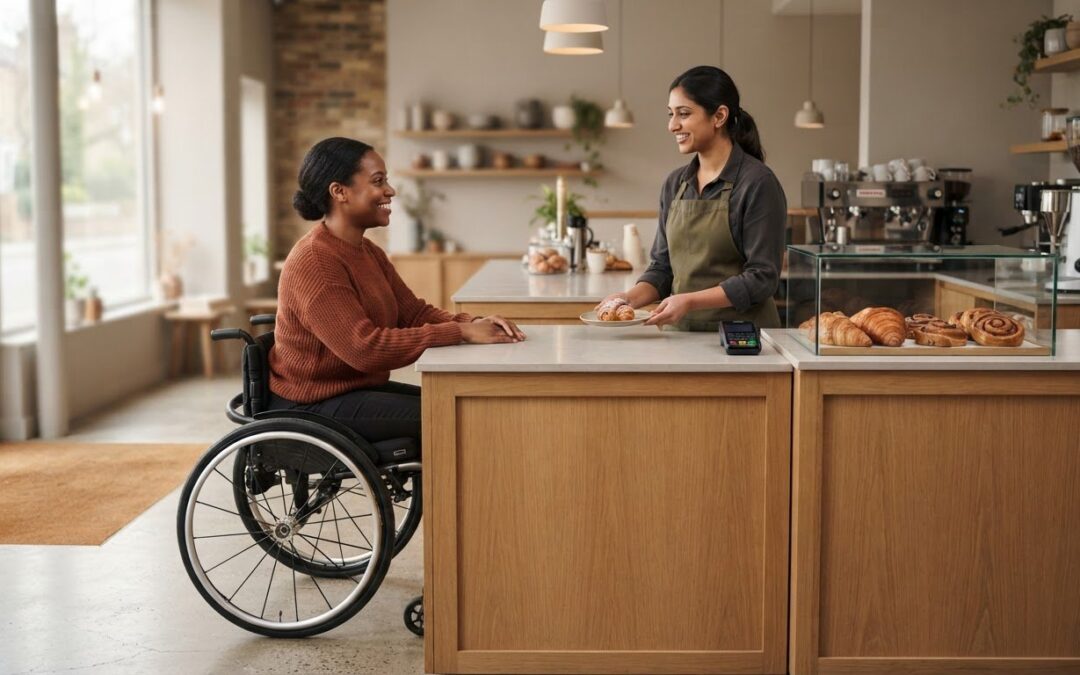
There isn’t one fixed cost for designing a counter for accessibility (DDA). The design depends on the counter’s size, materials and layout, as well as any surrounding changes needed to make the service point usable. It should also consider wheelchair clearance, reach and the building requirements that apply, including Part M.
It’s understandable to want a clear budget before committing to a commercial fit-out. An accessible counter isn’t simply a standard counter made lower; its height, knee space and customer-facing features all affect how people can approach and use it. In the UK, the Equality Act 2010 replaced the Disability Discrimination Act as the key legislation covering disability rights, according to the UK Government.
This guide explains the practical cost factors and how counter heights, wheelchair clearance, reach ranges and Part M shape the design. You’ll also see why customer interaction matters: a well-planned service counter can support access while fitting naturally into the way your business operates.
Key Takeaways
- Build the budget around the counter’s dimensions, materials, layout and any changes needed to its surroundings, rather than relying on a single standard cost.
- Plan usable knee and foot clearance alongside counter height so wheelchair users can approach the service point comfortably.
- Consider reach ranges for payment devices, screens and other customer-facing features as part of the counter design.
- Use Part M as a key design consideration, while keeping the customer interaction practical and welcoming.
- Explore how a purpose-designed Patisserie Display can support accessible service in a food retail or hospitality setting.
Counter height and wheelchair clearance
Accessible counter design balances a usable work surface with enough space for a wheelchair to approach. The counter height, knee clearance and surrounding layout all affect how comfortably customers can use it.
Accessible Counter and Worktop Heights
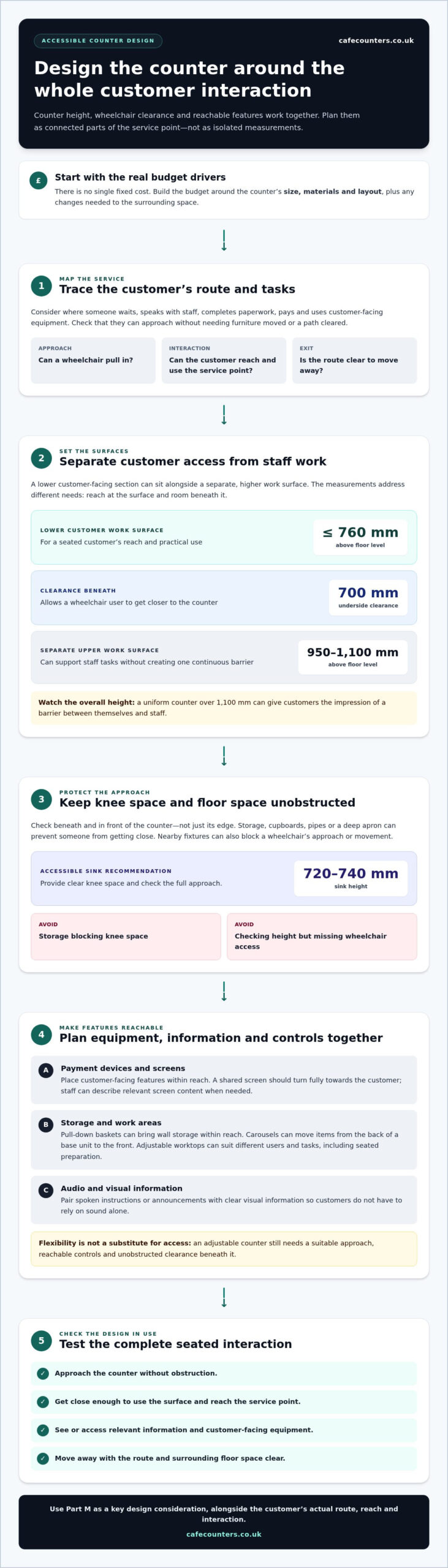
An accessible counter or worktop is positioned to support a seated customer’s reach and practical use. For reception desks and service counters, the lower work surface should be no more than 760 mm above floor level, while its underside clearance should be 700 mm. These measurements address different needs: surface height affects reach, while clearance allows a wheelchair user to get closer. A separate upper work surface can sit between 950 mm and 1,100 mm above floor level.
Wheelchair and Knee Clearance
Wheelchair clearance is the unobstructed space beneath and in front of a counter that lets someone approach and sit close. At a lavatory, knee space matters too, because pipes, cupboards or a deep apron can prevent a seated person from reaching the basin. An accessible sink is recommended at 720-740 mm high, with clear knee space. Check the full approach, not just the counter edge: a wheelchair needs room to pull in without nearby fixtures blocking movement.
Adjustable Counter Height
An adjustable counter changes height to suit different users and tasks. In kitchens serving people with varied needs, manually or electronically operated worktops can adapt the surface for seated food preparation or appliance access. This flexibility can make one area useful to more people. However, adjustment alone doesn’t make a layout accessible: the counter still needs suitable approach space, reachable controls and unobstructed clearance beneath the surface.
In the UK, the Equality Act 2010 replaced the Disability Discrimination Act as the key legislation covering disability rights, according to the UK Government. Official design guidance and national accessibility frameworks describe how organisations must fulfill their duties to improve access. TFSE Products Ltd understands that these regulatory standards help explain why accessible design must consider how people actually use a facility, rather than just focusing on the basic dimensions of a counter.
For a service counter, distinguish between the lowered customer section and the higher staff work surface. The lower section should provide a clear approach, while the upper surface can support staff tasks without creating a continuous barrier. A counter with a uniform height over 1,100 mm can give customers the impression of a barrier between themselves and staff. Plan the transition between surfaces around the service activity.
Common mistakes when designing for accessibility (DDA) include setting the surface too high, blocking knee space with storage, and checking the height without considering wheelchair access. Don’t treat an adjustable surface as a substitute for clear floor space and reachable controls.
Before finalising a layout, assess the counter from a seated position. Can someone approach, place items on the surface, reach the service point and move away without obstruction? A Deli Counter or Bespoke Serving Counter can be planned around these interactions, considering working height and clearance together.
Accessible facilities and reach ranges
Reach affects whether customers can use facilities independently, from reception areas to payment points. Assess the whole interaction, including seating, controls, information and the route between features. A counter may be within reach, yet still exclude someone if a screen is hard to see or a queue blocks their approach.
Start by mapping the customer’s tasks. At a reception desk, consider where someone waits, speaks with staff, completes paperwork and uses customer-facing equipment. Provide seating and counters that people can reach, positioned so customers can approach without moving furniture or asking staff to clear a path.
In a kitchen, reach involves both storage and preparation. Traditional worktops may be too high for some wheelchair users, so consider the user’s position and the task when planning the workspace. Accessible facilities can make everyday items easier to reach without repeated bending or stretching.
- Wall storage: Pull-down baskets bring stored items within reach. They can lower electronically or through a pull-down system.
- Base units: Carousels move items from the back of a cupboard to the front, reducing the need to bend or reach deep inside.
- Shared work areas: Adjustable worktops can suit different users and tasks, including seated food preparation.
Information and controls also need attention. If a customer-facing screen shows instructions or transaction details, make the information available in a format the customer can access. For example, staff can describe relevant screen content if a customer cannot read it. A shared screen should turn fully towards the customer, making it easier to view from their position.
Consider audio access too. If a facility plays spoken instructions or announcements, plan how customers who can’t hear them will receive the same information. Pairing audio with clear visual information helps customers follow the interaction without relying on sound alone. This applies to reception areas, payment points and other customer-facing facilities.
Reach also depends on the space around each feature. Keep floors clear so wheelchair users can pass through and turn comfortably. In an accessible kitchen, ceiling hoists can support movement between areas, with tracks concealed through considered design. These choices affect how people move through a facility, not just whether they can reach a particular control.
For a practical review, follow a customer journey from entrance to service point, then consider each task from a seated position. Access audits should include consultation with disabled people’s organisations, particularly disabled people’s access groups. Their input can reveal barriers that measurements alone may miss, such as obstructed routes or information that is difficult to use. For a commercial project, accessible counter planning can bring reach, layout and customer use into the same design conversation.
Accessible customer interaction counters and worktops
A customer counter is more than a work surface. It’s where people exchange information, make payments and ask for assistance. Design the interaction around the customer’s tasks, position and communication needs.
Counter Requirements Across Settings
Counter requirements depend on the building’s purpose and the service provided, so one layout may not suit every setting. A public reception desk supports conversations and forms, while a shop counter may focus on payments and handing over products.
University library check-in and checkout desks should include at least one lowered section between 750 mm and 850 mm high. University catering payment points should also provide at least one counter section within that range. These examples show why the service function matters alongside the overall layout.
In a workplace, consider whether visitors and staff use the same counter, and whether the service involves paperwork, a screen or payment. For a shop, map the transaction from queue to card reader and collection point. This helps the design support different interactions without assuming everyone approaches in the same way.
Features for Wheelchair Users and Limited Mobility
Accessible interaction features let customers approach, exchange information and complete tasks without unnecessary barriers. Position the card reader within reach, including for someone sitting at the counter. Keep it accessible throughout the transaction, rather than behind staff or among display items.
A screen shared by staff and customers should turn fully towards the customer, making on-screen information easier to view. Position customer-facing equipment so it fits naturally into the service sequence, rather than adding it as an afterthought.
Plan communication as carefully as equipment. Describe information shown on customer screens or provide it in a format the customer can access. If audio is played, consider how customers who can’t hear it will receive the same information. Signage should support clear wayfinding and instructions, while lighting should help customers see the counter, controls and displayed information.
Designing and Specifying an Accessible Counter
Specifying an accessible counter means turning customer tasks into clear design requirements before manufacture and installation. Start by mapping the service: identify where customers approach, speak with staff, view information, pay and collect items. Then decide which counter section supports each interaction.
Record where customer-facing items will go, including the card reader and any shared screen. Check that customers can reach the payment device and that the screen can turn towards them. For a library desk or university catering point, include the required lowered section within the specified height range.
Finally, review the whole interaction, not just the counter. Consider queue flow, communication, signage, lighting and equipment placement together. This makes the specification useful to both the counter designers and the staff who will operate it. For example, customers should be able to see transaction details and use the card reader without reaching awkwardly across a display.
Building Regulations Part M
Part M of the Building Regulations addresses access to and use of buildings. For counter projects, it provides important context for considering how disabled people enter, move through and use a space. Consider the counter as part of the wider route, not as an isolated piece of furniture. A lowered service point has limited practical value if customers cannot reach it easily.
The edition date matters when reviewing project documents. According to the UK Government, the 2015 edition took effect on 1 October 2015 for use in England. That date identifies the edition’s start for use in England; it does not, by itself, describe every counter detail. Design decisions still need to consider the building, its intended use and how customers interact with the service point.
Part M sits alongside design guidance used to consider access. Manchester City Council’s Design for Access 2 guidance is informed by BS 8300:2001 and Part M of the Building Regulations, 2004 Edition. This gives project teams a reference point for considering building approaches and users’ needs. It also reinforces the value of reviewing entrances, routes and service areas together.
For a counter installation, apply those broad access aims to the customer journey. Consider the approach from the entrance, movement around the service area and the point where customers speak with staff or pay. Then assess the counter in context: can a customer reach the service point without encountering a step or obstructed route?
- Review the building context: identify how customers reach the counter and whether the route supports access.
- Map the service interaction: note where customers wait, communicate, view information and complete a transaction.
- Record the design rationale: connect counter location and layout decisions to the needs of people using the space.
Planning documents can help explain the design decisions. Manchester City Council’s manual recommends submitting an Access Statement alongside a planning application, building notice or proposals for building regulations approval. The statement can explain how the design considers access, including how the counter relates to the wider premises. This is particularly useful when changing an existing layout or adding a service area.
Part M should inform the design from the outset, not become a final check after the counter is specified. Use the applicable edition for the project’s location, review access across the premises and document how the counter supports the service. This keeps the design focused on both the physical environment and customers’ ability to use it.
What accessible counter features are needed for wheelchair users and people with limited mobility?
An accessible counter combines a usable approach, clear space and reachable customer-facing equipment. A lowered section alone won’t address every barrier if a wheelchair user can’t pull in, reach the payment point or communicate comfortably with staff.
Provide a clear kneehole so a wheelchair user can pull close to the counter instead of stopping at its edge. For example, a library check-in desk should have space beneath the counter for a wheelchair to approach. Keep this area free from fixed cupboards, supports and stored items that could obstruct the user’s knees or footplate.
Width affects whether the accessible section works for different customers and tasks. Guidance for reception desks and service counters describes a lower section 1,800 mm wide, with 1,500 mm as the minimum width. This gives customers room to position themselves and use the surface, while staff can maintain the adjacent service area. Consider the counter’s full working length when allocating space for equipment and displays.
Keep the customer-facing side clear. Position the card reader within reach and ensure a customer sitting at the counter can use it from their seated position. Don’t fix it too far away or block it with products. A shared screen should also turn fully towards the customer, so they can view transaction information without straining or leaning.
- Approach: preserve an unobstructed route to the counter and the kneehole area.
- Surface: keep the accessible section available for the customer’s belongings and transaction.
- Equipment: position the card reader and screen so customers can reach and use them.
- Display items: avoid placing products where they block the customer’s view or access to controls.
Include items placed on the counter when assessing its overall height. The highest part of a customer counter, including objects on it, should be no more than 1,100 mm high. Tall displays, signs or equipment can therefore affect access even when the counter itself is lower. A clear customer-facing area helps preserve sightlines and supports a direct conversation across the service point.
In a busy deli, these features need to work throughout an actual purchase: the customer approaches, views the options, pays and receives their order. A well-planned Deli Counter can accommodate these interactions without letting display equipment dominate the accessible section. Consider customer movement alongside staff service tasks when arranging the layout.
Plan a bespoke accessible serving counter around the approach, clear kneehole, payment equipment and customer display area, so these features work together as one service point.
TFSE Products: Patisserie Displays
TFSE Products Ltd supplies Patisserie Displays for food retail and hospitality settings where presentation and customer service need to work together. Once you’ve considered approach space, reach and payment interactions, the display can be planned as part of the wider counter layout rather than as a standalone feature.
For a broader serving area, consider Integrate Drop-in Units, Grab & Go Displays and Salad Bars alongside the customer journey. The right arrangement depends on how customers view, select and pay for products, and how staff serve them. Keep the accessible service point clear when planning display equipment and customer-facing controls.
Contact TFSE Products Ltd to discuss your food display requirements, or visit cafecounters.co.uk.
Plan an Accessible Service Point That Works
Accessible design is strongest when it shapes the project from the first layout discussion, rather than being added after equipment and finishes are chosen. A project focused on designing a counter for accessibility (DDA) should consider the customer journey alongside daily service tasks. Plan how people approach, interact with staff, view products and pay, then coordinate these needs with the wider counter design.
TFSE Products Ltd offers Patisserie Displays, Integrate Drop-in Units and Grab & Go Displays for food retail and hospitality environments. When designing a counter for accessibility (DDA), consider these display options alongside the service layout to plan how products and customer interactions fit within the space. A clear project brief covering the intended service and access priorities gives the design process a practical starting point.
Contact TFSE Products Ltd about accessible counters to discuss the requirements for your commercial space. A considered plan can support an efficient service flow while making the customer experience more welcoming.
Frequently Asked Questions
Is DDA compliance mandatory?
The Disability Discrimination Act is no longer the key legislation covering disability rights in the UK. The Equality Act 2010 replaced it, according to the UK Government. For a business planning a service counter, the practical focus should be whether disabled customers can use the premises and service. Assess the counter as part of the customer journey, including access to information, payment and staff assistance.
What does DDA stand for?
DDA stands for Disability Discrimination Act. The name refers to the former UK legislation, rather than a measurement or counter specification. Manchester City Council describes the Disability Discrimination Act 1995 as a framework for organisations’ duties to improve access. In present-day discussions about counter design, the acronym is commonly used to describe accessibility aims, while the Equality Act 2010 is now the key disability-rights legislation.
What is the DDA law in the UK?
The DDA refers to the Disability Discrimination Act, including the 1995 Act described by Manchester City Council as a framework for improving access. The UK Government states that the Equality Act 2010 replaced the Disability Discrimination Act as the key legislation covering disability rights in the UK. For a counter project, use “DDA” as familiar shorthand, but understand the current legislative context through the Equality Act.
What does DDA mean in accessible counter design in the UK?
In counter design, “DDA” is commonly used as shorthand for designing a service point with disabled customers’ access in mind. It doesn’t refer to one universal counter size. A shop payment point and a public reception desk, for example, involve different tasks and equipment. Consider how customers approach, communicate, view information and complete transactions, then shape the counter layout around those interactions.
What are the recommended accessible counter heights and dimensions in UK guidance?
Guidance for reception desks and service counters gives a lower work surface height of no more than 760 mm, with an upper work surface between 950 mm and 1,100 mm above floor level. It also describes a lower section 1,800 mm wide, with 1,500 mm as the minimum. Treat these as design references for the relevant counter type, and assess the whole service layout alongside dimensions.
How much clear knee and wheelchair space should an accessible counter provide?
For a reception desk or service counter, the underside clearance of the lower work surface should be 700 mm. This helps create space beneath the counter, but the usable approach also depends on what occupies the area and whether the wheelchair can pull close. Keep the knee space free from cupboards and stored items, and consider the customer’s route to the counter and position during the interaction.