

A display cabinet that’s too warm doesn’t automatically have a failed compressor. The common points of failure in display refrigeration often start with restricted airflow, poor heat rejection, drainage problems or operating conditions that put extra strain on the equipment. Spotting a pattern early can help protect product quality and keep day-to-day service running reliably.
Temperature fluctuations, ice build-up or unexpected water can be worrying, but these signs may have several causes. They can point to an obstructed air path, a door left open or a fault that needs a qualified engineer. Basic observations help operators describe the problem, but electrical and refrigeration-system repairs should be left to a professional.
This guide covers common display refrigeration faults, likely causes and safe observations to make before escalating an issue. It also explains how operating habits, planned maintenance and equipment selection can help reduce repeat problems. Considering access, airflow and commissioning during a new display project can help businesses make more informed equipment decisions.
Key Takeaways
- Temperature changes, condensation, unusual noise and water around a cabinet are clues to investigate, not proof of a specific fault.
- The common points of failure in display refrigeration often involve airflow, heat removal, drainage or operating conditions. Compare these possibilities before assuming a component has failed.
- Operators can protect affected food, record temperature readings and check visible airflow and doors. Electrical and refrigeration-system work should be left to a qualified engineer.
- Good equipment planning considers the products on display, customer access, replenishment routines and room for cleaning and servicing.
- Installation and commissioning help verify that a display operates against manufacturer specifications in its intended setting.
Common points of failure in display refrigeration: symptoms operators notice first
A display refrigeration problem doesn’t always mean a complete breakdown. The cabinet may still be running but struggling to hold an even temperature, remove heat or drain water correctly. The common points of failure in display refrigeration can show up as rising or fluctuating readings, warm areas, excess condensation, unfamiliar noise or water around the cabinet.
These clues help staff describe what has changed, but no single symptom confirms a particular component fault. A cabinet operates through a vapor-compression refrigeration cycle, and problems with either the equipment or its operating conditions can produce similar signs.
A symptom is evidence that performance has changed; it isn’t proof that a specific component has failed. If product temperatures raise a food-safety concern, act promptly under your workplace food-safety procedures rather than waiting to identify the technical cause.
What does poor cooling or uneven temperature suggest?
Blocked vents, frequent door opening or loading that restricts the designed airflow can make temperature control less stable. A warm patch in one part of the cabinet may point to a local airflow or loading issue. A rise across the whole display may suggest a broader loss of cooling or an operating condition affecting the unit overall. These are possibilities, not remote diagnoses.
Record readings, when they were taken and which areas seem affected. Note whether the pattern changes after replenishment or during busy service. This detail gives an engineer a clearer account of the problem and helps distinguish a recurring pattern from a one-off observation.
Why are condensation, noise or water useful clues?
Condensation may relate to humid conditions, doors or seals, restricted airflow or drainage. Water around the cabinet can indicate that condensate isn’t draining as expected, but its location and timing matter. Note whether moisture appears inside or outside the unit and whether it follows door opening, cleaning or a change in service activity.
A new or unusual sound is also worth recording. Note where it seems to come from, when it occurs and whether it coincides with a temperature change. Persistent or worsening noise, repeated water accumulation or concerning product readings call for prompt action through workplace procedures and appropriate technical assessment. Don’t remove panels or attempt electrical or refrigeration-system checks.
How display refrigeration works, and where common failures develop
A refrigerated display transfers heat from inside the cabinet to the surrounding environment. In a typical vapour-compression system, refrigerant absorbs heat at the evaporator, then carries it to the condenser, where the heat is released. The compressor circulates refrigerant through the system, while an expansion device helps prepare it to absorb heat again. Together, these stages form the vapour-compression refrigeration cycle.
Each component has a distinct role. The evaporator cools air inside the cabinet, and fans move that air around the display. The condenser releases heat outside the cooled space, while the compressor drives refrigerant through the sealed circuit. A thermostat or other control monitors conditions and regulates operation. The condensate drain carries away water produced as moisture collects during cooling. Issues in any of these areas can affect temperature, airflow or moisture management, but symptoms alone don’t confirm a component fault.
How airflow and heat rejection affect cabinet performance
Evaporator fans circulate cooled air through the cabinet to help it reach the intended display areas. Blocked vents or products arranged across an air path can interfere with circulation and contribute to uneven cooling. The condenser also needs to release heat effectively. If its ventilation area is obstructed, heat transfer may be hindered and the system placed under additional strain.
Ventilation arrangements differ by equipment design, so follow the manufacturer’s instructions rather than assuming every display needs the same clearance or layout. When planning a café counter, consider how the unit’s position and surrounding joinery affect access to ventilation areas. A commercial café counter design can be planned around the site and intended use.
What the control, compressor and drainage systems contribute
The control system helps regulate operation in response to cabinet conditions. Fluctuating readings don’t by themselves establish a control fault: airflow, heat rejection, loading and other factors may also contribute. The compressor circulates refrigerant within a sealed system. Operators should not open the refrigeration circuit or attempt work on electrical components; those checks require qualified technical assessment.
Moisture removed from the cabinet needs a clear route through the condensate drain. A blockage or drainage issue may contribute to water collecting where it shouldn’t, though the location and timing of the water are clues rather than a definitive diagnosis. Follow the unit’s instructions and workplace procedures. The FDA Food Code is a US reference, not UK food-safety guidance, so UK operators should follow their applicable workplace procedures.
Understanding how these parts work together makes the common points of failure in display refrigeration easier to investigate methodically. Airflow and heat rejection are central: stable cabinet cooling depends on moving air effectively inside the display and releasing heat efficiently outside it.
Is the display cabinet itself at fault? Compare likely causes before assuming failure
A warm cabinet doesn’t automatically need replacing. The common points of failure in display refrigeration include equipment faults, but loading, access and surrounding conditions can produce similar symptoms. Compare what you observe with how the cabinet is being used, then record any patterns. The possibilities below can guide your observations, but they aren’t a diagnosis.
| Symptom | Possible operating cause | Possible equipment cause | Sensible next observation |
|---|---|---|---|
| Some products or areas feel warmer | Overloading, blocked vents or products added before the cabinet stabilises | Fan or airflow-system problem | Check whether the affected area aligns with obstructed air paths and note when loading occurred. |
| Temperature rises during busy service | Repeated door opening or frequent replenishment | Control or refrigeration-system fault | Compare readings during quieter periods and busy service. |
| Cooling remains inconsistent | Surrounding conditions may not suit the unit’s operating requirements | Fan, control or sealed-system issue | Record readings and any alarms; check the manufacturer’s operating guidance. |
| Water collects around or inside the cabinet | Moisture associated with use or cleaning | Drainage problem | Note where water appears and whether it recurs. |
When might the cause be loading, access or the surrounding environment?
Check whether products are stacked across supply or return-air paths, or whether the cabinet is being filled before it has stabilised after start-up. Repeated opening can also affect conditions inside the display. Compare the temperature pattern with normal service periods, replenishment times and the cabinet’s location. Use the manufacturer’s instructions to understand the intended loading and ventilation arrangements.
When do symptoms point towards a technical fault?
If instability continues after basic operating checks, or alarms and unusual operating patterns recur, arrange a technical assessment. Fan, control, drainage and sealed-system issues are possible categories, not conclusions an operator can draw from symptoms alone. Electrical and refrigerant-system work should be left to appropriately qualified personnel. ENERGY STAR’s commercial refrigeration maintenance guidance discusses general practices such as keeping coils clean and checking door seals. Follow the cabinet manufacturer’s instructions for the specific unit.
A clear record of readings, loading and operating conditions helps distinguish a repeatable use-related pattern from a fault that needs investigation. It also supports a more informed decision about the equipment’s condition before replacement is considered.
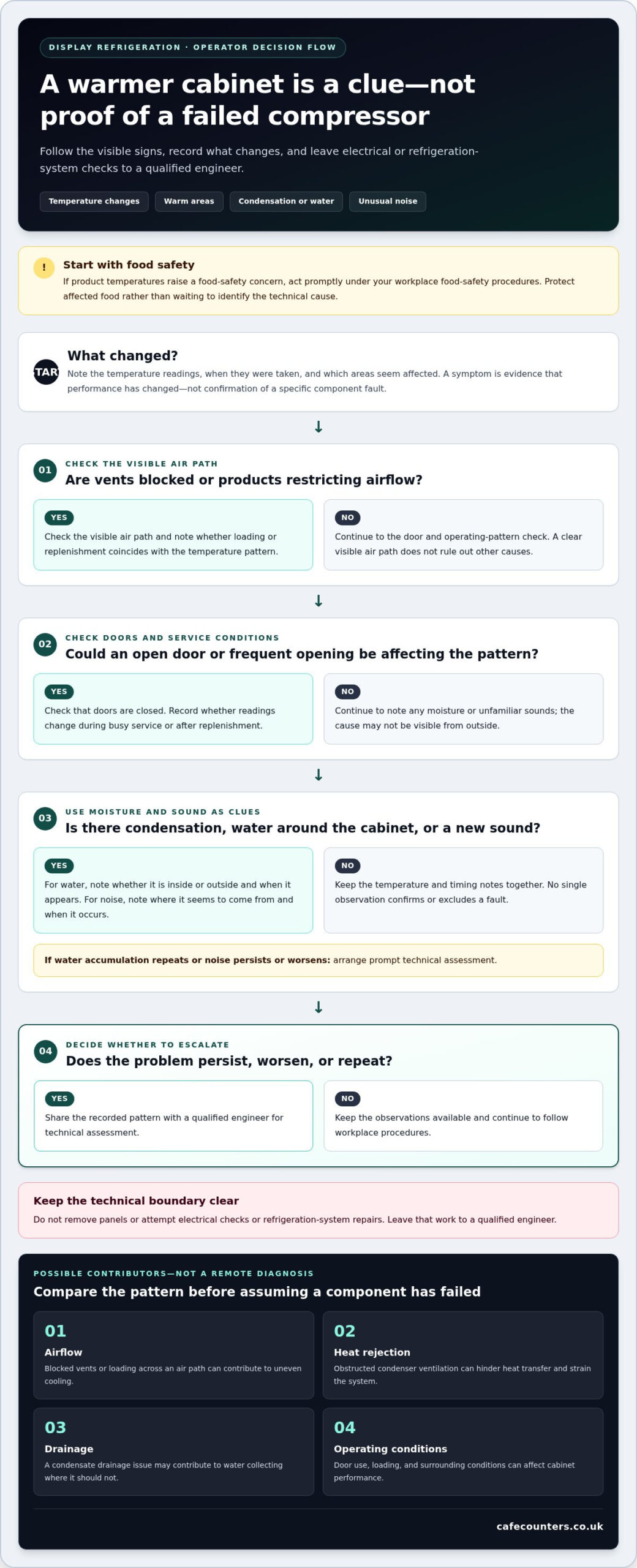
What to check first: a safe operator checklist for display refrigeration
Use the same sequence when a display behaves unexpectedly. The common points of failure in display refrigeration can look similar from the outside, so focus on protecting food, recording what you observe and checking only what the unit instructions identify as safe.
- Protect affected food. Follow your workplace food-safety procedures if product temperatures cause concern. Record any actions taken, and don’t rely on the cabinet display alone to decide whether food is safe.
- Note the readings. Record the displayed temperature, the time and whether readings change. Follow the unit instructions and site procedures for taking or checking temperatures.
- Check visible airflow. Look for products or packaging blocking designed vents. Don’t move internal panels or reach into areas that aren’t intended for operator access.
- Inspect the doors. Observe whether doors close as intended and look for visible damage to accessible seals. Don’t dismantle or adjust components.
- Record the pattern. Note cabinet load, surrounding conditions, affected areas, alarms, noise or water, and whether symptoms follow busy service, replenishment or cleaning.
Which routine checks can operators make safely?
Keep checks visual and follow the manufacturer’s instructions for accessible cleaning. Clear products from designed air paths where safe to do so, and note visible seal damage without attempting repairs. Keep records of cleaning and observations in line with workplace procedures. The unit manual takes precedence because cleaning access and operator checks vary by cabinet design.
When should operation be escalated for technical assessment?
Escalate persistent abnormal temperatures, repeated alarms, unusual noise or recurring water leaks through your site’s established process. Record the time, temperature, load, ambient conditions, symptom pattern and any action taken. This creates a clearer handover and helps distinguish a one-off observation from a recurring problem.
Don’t remove covers, handle refrigerant circuits or attempt electrical or component repairs. Those tasks require appropriately qualified personnel. Operators can provide useful observations, but should not try to confirm a technical fault or make repairs themselves.
For a new or replacement counter, consider how the display will suit its products, service pattern and available access. Explore commercial display solutions designed with the working environment in mind.
Prevent repeat display refrigeration failures through better equipment planning
Reliable operation starts before a display is installed. Matching the cabinet to the products, service format and working environment can reduce avoidable strain and make day-to-day use more straightforward. The common points of failure in display refrigeration are easier to prevent when airflow, access, replenishment and cleaning are considered as part of the counter plan.
How should a display unit match its working environment?
Start with what the display needs to hold and how staff and customers will use it. A patisserie display, deli counter and grab-and-go unit each serve a different presentation and replenishment pattern. Consider how often staff restock, how customers access products and whether the layout makes it easy to keep the cabinet arranged as intended.
Plan the unit’s position alongside its surroundings. Allow for the ventilation and access requirements in the equipment guidance, and consider nearby heat sources, cleaning routines and the space needed to reach the cabinet for routine care. These details matter in both a new fit-out and a refurbishment: an attractive counter should also support practical operation and upkeep.
How do design, installation and commissioning support reliable operation?
Site surveys and CAD modelling can help resolve space, services and equipment access before manufacture and installation. Planning these details early can reduce layout conflicts, such as joinery restricting access or the display being positioned where its ventilation arrangements are difficult to maintain. Commercial displays designed and manufactured in the UK can be planned around the intended products and service conditions.
Installation and commissioning provide an opportunity to check that equipment operates in line with the manufacturer’s specifications. A clear handover, including operating guidance and records, helps staff understand normal use and recognise changes in performance. Routine care should follow the unit instructions, while technical work remains with appropriately qualified personnel.
TFSE Products Ltd brings design, UK manufacturing, CAD modelling, site surveys, installation and commissioning together for commercial food display projects. Planning the equipment and its setting as one project supports a considered result, from initial layout through to operation.
Discuss a commercial display project with TFSE to plan equipment around your products, service pattern and site.
Build reliability into your next display decision
Display refrigeration symptoms are clues, not diagnoses. A warm area, excess moisture or unfamiliar noise can arise from operating conditions as well as equipment faults, so begin with safe observations and a clear record. If abnormal temperatures persist or alarms recur, escalate the issue for technical assessment and follow workplace food-safety procedures.
Understanding the common points of failure in display refrigeration also helps prevent repeat problems. Match the cabinet to its products and service pattern, and plan for suitable airflow, ventilation, cleaning and access from the outset. These practical decisions support dependable operation throughout the working day.
TFSE designs and manufactures commercial food display equipment in the UK, with project support that can include CAD modelling, site surveys, installation and commissioning. This joined-up approach helps account for site conditions and verify operation against manufacturer specifications. Explore TFSE’s commercial display solutions and take a considered next step towards a display that fits your operation.
Frequently Asked Questions
What are the most common points of failure in display refrigeration?
The common points of failure in display refrigeration often involve restricted airflow, poor heat release, drainage problems or operating conditions. Blocked vents, heavy loading and frequent door opening can affect performance; equipment-related possibilities include fan, control, compressor or sealed-system faults. Condensation, noise and changing temperatures are clues, not confirmed diagnoses. Operators can record readings and visible symptoms, but electrical and refrigeration-system checks should be handled by appropriately qualified personnel.
Why is my refrigerated display cabinet not staying cold?
A cabinet may struggle to stay cold because products obstruct airflow, doors are opened frequently, the display is heavily loaded or its surrounding conditions affect operation. A technical issue involving a fan, control or refrigeration system is also possible. Check the unit instructions, note readings and when they change, and look for visible obstructions. If temperatures remain abnormal, follow workplace food-safety procedures and arrange a technical assessment.
Can overloading cause a display fridge to stop cooling properly?
Yes. Overloading can restrict the designed air paths, leaving some areas warmer or making cabinet temperatures less stable. Products placed in front of vents may affect air circulation even if the refrigeration system is operating. Follow the manufacturer’s loading guidance, keep vents clear and note whether the pattern changes after rearranging products safely. If cooling remains abnormal, don’t assume loading is the only cause; record the symptoms and escalate them.
What should I check first when a display fridge is making unusual noise?
First, note when the sound occurs, where it seems to come from and whether it coincides with temperature changes, alarms or a particular operating period. Check only what’s safely visible, such as whether items or packaging are obstructing intended airflow. Don’t remove covers or attempt to inspect fans, wiring or refrigeration components. If the noise is persistent, worsening or accompanied by other abnormal signs, arrange a technical assessment.
Why is water collecting inside or around a refrigerated display?
Water may be associated with condensation, humidity, door use, airflow or condensate drainage. Its location and timing can help narrow down what to investigate, but they don’t confirm the cause. Record whether it appears inside or outside the cabinet and whether it follows cleaning or busy service. Follow the unit’s cleaning instructions, manage any immediate workplace risks and escalate recurring leaks or water accumulation for technical assessment.
How often should commercial display refrigeration be checked?
There isn’t one inspection interval that suits every display. Operators should make routine visual observations as part of workplace procedures, record temperature readings as required by their food-safety processes, and follow the manufacturer’s instructions for cleaning and care. Technical inspection and maintenance timing should follow the equipment guidance and site arrangements. Keep records of checks, cleaning and recurring symptoms so changes in performance are easier to identify.
When should a display refrigerator be repaired rather than replaced?
That decision depends on a technical assessment of the fault, the unit’s condition, its operating reliability and whether it still suits the business’s needs. A warm cabinet alone doesn’t prove replacement is necessary. Record recurring symptoms and any previous changes, then use the findings to inform the decision. If a display no longer supports the products, service pattern or site layout, planning a suitably matched replacement may be appropriate.