

A display unit is only as effective as the team using it. Good staff training for new display units follows a clear sequence: explain the task, demonstrate each action, let staff practise, then give feedback and check understanding. Break procedures into manageable stages so employees can learn to use and care for the equipment consistently.
New equipment brings practical questions: which tasks should staff learn first, how can managers spot uncertainty, and when is an employee ready to work independently? A structured approach answers these questions without overwhelming new starters or disrupting day-to-day service unnecessarily.
This guide explains how to plan training around your operation, demonstrate tasks clearly and make procedures repeatable. You’ll also learn how to check understanding, give useful feedback and build staff confidence through supervised practice, helping the equipment become a reliable part of your workplace.
Key Takeaways
- Break equipment procedures into clear stages and give staff a short checklist to support practice.
- Demonstrate each task before employees try it, highlighting common points where mistakes can occur.
- Check understanding by asking staff to explain steps in their own words and observing where they hesitate.
- Give focused feedback, then let employees repeat the task while the guidance is fresh.
- Plan training around service demands, with dedicated time for practice and a suitable way to assess progress.
Checking learner understanding
An understanding check tests whether a learner can explain and perform a task. Before moving a unit, assess the lift, load, route and workers involved. Reduce manual-handling risks with suitable aids or planned team handling. Avoid working at height where practicable; otherwise, plan safe access and fall prevention. Retail display installation and use should follow workplace risk assessments and control procedures covering setup, operation, cleaning and foreseeable contact with staff or customers.
Ask learners to describe each task in their own words before they practise. For example, ask them to explain how they will move around a unit without obstructing a customer route. Their answer shows whether the instruction made sense and reveals gaps a simple “understood?” might miss. In education and workplace training alike, learners need a chance to explain, not just agree.
Pause between task stages to check understanding before confusion builds. Ask a focused question about the next action, such as what to do before switching on a display, then observe the learner carrying it out. Hesitation, repeated questions or skipped steps can show where the explanation needs clarification.
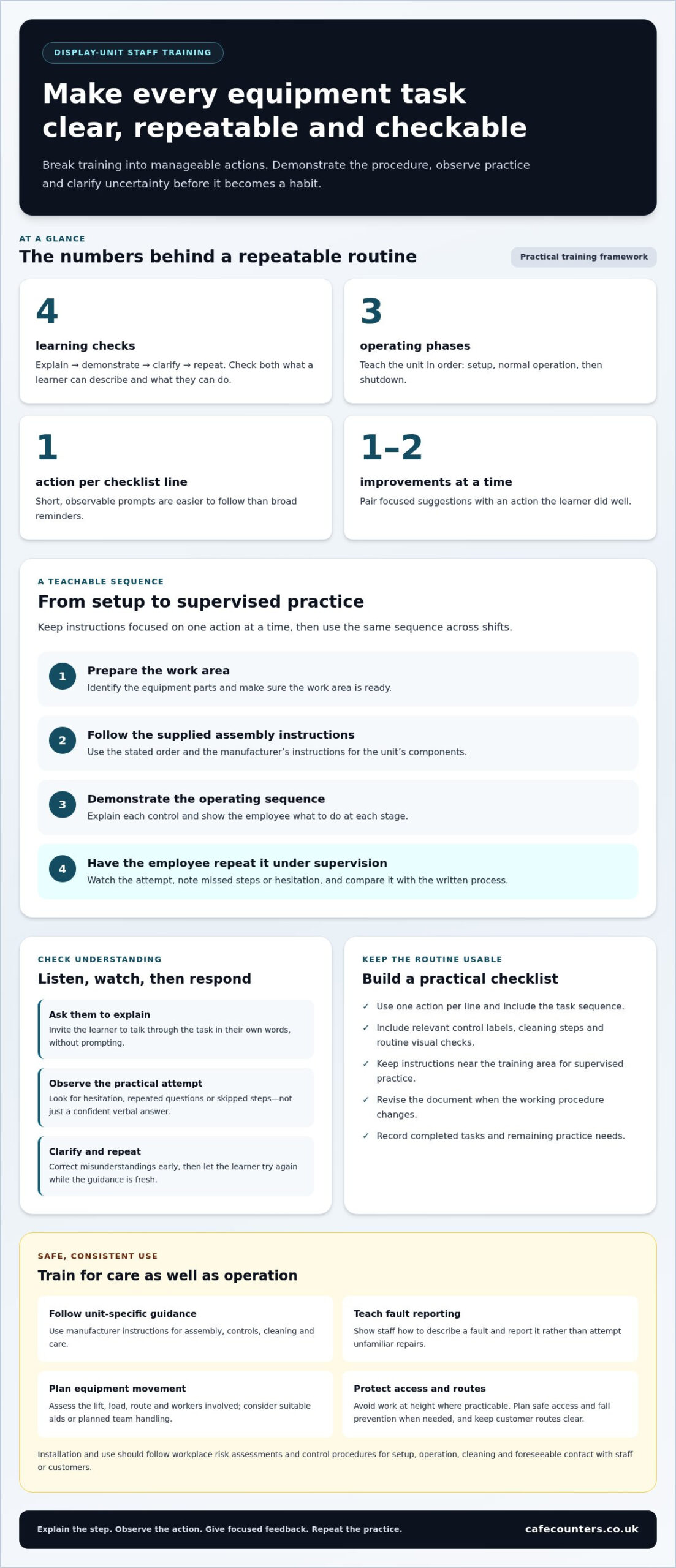
- Explain: Ask the learner to talk through the task without prompting.
- Demonstrate: Watch their practical attempt and note uncertainty or missed steps.
- Clarify: Correct misunderstandings early, before they become habits.
- Repeat: Invite the learner to try again after receiving guidance.
Feedback works best when it is specific and manageable. Name an action the learner did well, then offer one or two practical improvements. For example, praise a clear preparation step, then remind them to keep the route clear while moving equipment. Avoid giving several corrections at once, which can make the priorities harder to remember.
Ask the learner to repeat the task soon after feedback. They can apply the advice while it is fresh, and you can observe another attempt. If the same mistake recurs, explain that step differently and watch again. Keep a brief record of completed tasks and remaining practice needs so supervisors can see what the learner has demonstrated.
Judge understanding through both explanation and action. A learner may describe a procedure accurately but still need supervised practice with the equipment. A correct attempt, meanwhile, may rely on imitation rather than understanding. Ask why a step matters, then watch the learner apply it. This helps establish whether they can repeat the task consistently and recognise when they need guidance.
Explain why each step matters and ask the learner how it fits into the task. Invite them to describe the process in their own words to check that the instruction was clear. During practice, observe closely and note hesitation or uncertainty rather than relying on a confident verbal answer alone.
Use your observations to guide the next response. Identify an action done well, then give one or two practical suggestions for improvement. Address misunderstandings promptly, while the learner can still connect the guidance to the task, so a small mistake is less likely to become a habit. Clarify the point, ask the learner to explain it again, and observe whether the uncertainty has eased during practice.
Breaking tasks into clear, repeatable steps
A repeatable procedure turns equipment use into teachable actions. A practical programme shows staff how to assemble, operate, clean and check each unit in sequence.
Assembly and Operation Steps
Assembly and operation steps are ordered instructions for preparing and using a display unit. Demonstrate each stage, explain the action, then let staff practise under supervision. Start with setup, move to normal operation, and finish with shutdown. Follow the unit’s instructions for its specific components and controls.
Separate tasks that require different skills. For example, show staff how to prepare the work area before explaining the operating controls. Keep each instruction focused on one action, such as positioning a component or selecting the correct control. Staff can then connect each action to the next without trying to memorise a long procedure.
- Prepare the work area and identify the equipment parts.
- Follow the supplied assembly instructions in their stated order.
- Demonstrate the operating sequence and explain each control.
- Ask the employee to repeat the sequence while supervised.
Use the same sequence across shifts. If employees learn different routines, handovers can become inconsistent. A supervisor can compare each practice run with the written process and clarify steps that staff miss or misunderstand.
Training Materials and Checklists
Training materials are practical references that help employees learn and repeat equipment tasks. A checklist turns a procedure into short prompts, while diagrams or written instructions help staff recall component names and the order of tasks.
Build the checklist around observable actions rather than broad reminders. For example, “check the work area is clear” is easier to follow than “prepare safely”. Include the task sequence, relevant control labels, and space to record practice or questions. Keep instructions near the training area so learners can refer to them during supervised practice.
- Use manufacturer instructions for the unit’s specific assembly and controls.
- Write one action per checklist line.
- Include cleaning steps and routine visual checks.
- Revise the document when the working procedure changes.
Routine maintenance means following the unit’s care instructions to keep it clean and ready for use. Train staff to clean it using the stated method, carry out routine checks and report faults rather than attempt unfamiliar repairs. For troubleshooting, show them how to describe the issue, note when it occurs and follow the documented response.
Use a short practice review to confirm the checklist works in real conditions. Ask an employee to complete the task using only its prompts, then note any unclear wording. This small edit can make the programme easier to use across different shifts and experience levels. Keep the latest version accessible, and remove outdated copies to prevent conflicting instructions.
Demonstrating tasks
A task demonstration is a clear, practical walkthrough of a work procedure. For a new display unit, show the relevant task before asking an employee to perform it. Explain each action as it happens so the learner can connect the instruction with what they see.
Set up the demonstration in the conditions staff will encounter during normal work. Identify the task and its intended result, then show the process at a steady pace. For example, demonstrate the unit’s operating sequence using its controls and instructions. Avoid rushing through actions that may be familiar to an experienced trainer but new to a learner.
Make the demonstration visible and easy to follow. Stand where staff can see each action clearly, and name each component as you use it. If a task has several stages, pause between them. Explain why the next action follows, then continue when learners can follow the sequence. This is easier to understand than a silent, uninterrupted performance.
Point out common mistakes during the demonstration. If a control could be confused with another, show the difference before moving on. If staff often miss a preparation step, highlight it at the relevant moment. This gives learners a reason to pay attention and helps them recognise the correct action when they practise.
- Explain: Name the task and describe its intended outcome.
- Show: Perform each action clearly, explaining it as you go.
- Highlight: Point out common errors at the step where they could occur.
- Invite practice: Let the learner try the task after the walkthrough.
- Discuss: Give feedback and let the learner respond with questions.
After the demonstration, ask the employee to perform the task while you observe. Resist stepping in at the first pause. Give the learner time to recall the sequence, intervening if they are about to make a significant mistake. Once they finish, discuss what went well and what to improve on the next attempt.
A consistent session follows a simple pattern: explain, demonstrate, practise, then finish with feedback and discussion. This takes staff from seeing a task for the first time to trying it themselves. Trainers can use the same format across shifts while adapting explanations to the equipment and the learner’s experience.
Managers who regularly train colleagues can benefit from structured train-the-trainer learning. It provides practical tools for explaining tasks, guiding learners and running sessions. A trained demonstrator can make procedures easier to follow, answer questions clearly and support consistent instruction across the workplace.
Keep the walkthrough focused on the task the new employee is about to try. Show the procedure clearly and explain each action before inviting the employee to perform it, so the learner has seen what to do. During the demonstration, identify the points where mistakes commonly happen and draw attention to them as they arise. This helps learners know which parts deserve extra attention when they attempt the task themselves.
Finding staff training courses
A staff training course is structured learning that builds knowledge or practical workplace skills. Choose training that matches the equipment, the employee’s role and the tasks they need to perform. A customer service course alone, for example, won’t teach someone to use a unit’s controls or follow its operating instructions.
Training should match the unit’s functions. Digital displays require instruction on their interface and content controls; refrigerated units require training based on their operating and cleaning instructions; promotional displays need guidance on arranging products and keeping information current. When rolling out branded signage or promotional display assets from providers like colourgraphics.com, ensure team members know how to inspect, handle, and refresh printed elements properly. Staff should practise the tasks they will actually perform, rather than rely on general technical training.
Before selecting courses, list the work employees need to do. Separate tasks requiring specialist technical knowledge from routine operation, cleaning and fault reporting. Match each learning outcome to a course or supervised workplace instruction. A useful course description makes clear what learners will be able to do, rather than simply naming a broad subject.
Apprenticeship units offer a distinct route for existing employees aged 19 and over. They typically take 4 to 20 weeks of part-time study, while units in England last 30 to 140 hours. They develop selected skills, but they don’t replace practical familiarisation with a particular display unit or its instructions.
- Compare the learning outcome: Does it cover a real task in the employee’s role?
- Check the format: Can learners practise the relevant skills?
- Plan equipment instruction: Pair broader learning with hands-on workplace training.
- Review the result: Observe staff applying the learning to their duties.
Training should cover risks relevant to the specific unit and its location. Include practical examples such as keeping customer routes clear, recognising damaged components and knowing how to report a problem. Staff should follow the equipment’s instructions and workplace procedures, not attempt unfamiliar repairs. Cover safe handling and access arrangements in the task briefing.
For digital, refrigerated or promotional displays, tailor training to the controls, operating procedure, cleaning method and daily tasks. Risks also vary by unit and setting, so include relevant hazards in the briefing, show staff how to report faults and explain which tasks need supervisor guidance. This keeps the training connected to employees’ actual work.
In England, apprenticeship unit funding cannot pay for employer induction activities for a learner. Treat induction and equipment familiarisation separately from funded apprenticeship learning, and plan each around its purpose. Employers using apprenticeship units should work with their training provider to plan delivery around business operations, agree an appropriate assessment approach and give employees dedicated time to take part.
Planning training around business operations
Operational training planning means arranging learning so staff can practise without disrupting essential service. Map each task to quieter work periods, available supervisors and the unit’s planned introduction.
There is no set duration for training staff on new display units. The time depends on the tasks involved, the equipment’s complexity and each employee’s demonstrated ability to do their role. A short orientation may cover basic controls, while several supervised sessions may be needed for a wider set of duties.
Build the schedule around actual service patterns. For example, train one group before a busy period and another during a quieter shift. Keep enough experienced staff available for customers and give each learner dedicated practice time. Avoid scheduling every trainee together if that would leave the operation without suitable cover.
For apprenticeship units, employers should work with their training provider to plan delivery around business operations and agree an appropriate assessment approach. Employees should receive dedicated time to take part in training. Apprenticeship units typically take 4 to 20 weeks of part-time study, giving managers a planning window that can be coordinated with work schedules.
Use a simple planning sequence:
- List the tasks each role requires, such as opening, operation, cleaning, and reporting faults.
- Identify suitable training windows across shifts and assign a supervisor.
- Schedule practice alongside normal work, without removing essential service cover.
- Record attendance, completed learning, and any further supervised practice.
A training register records who attended and which tasks they practised. Keep it alongside the programme schedule, noting each employee’s role and progress. This gives managers a clear view of outstanding learning and supports consistent handovers between shifts. It also helps employees see how equipment skills contribute to their responsibilities and career development.
Review the plan after staff begin using the unit. If a task takes longer than expected or creates a bottleneck, move practice to a different shift or split the instruction into manageable sessions. Ask supervisors to record recurring questions, then update the schedule or training materials accordingly. A practical plan responds to service demands while preserving time for safe, attentive learning.
For a display project, consider the staff workflow alongside the physical layout. Discuss your display project as you plan how employees will use the space during service.
TFSE Products: Patisserie Displays
TFSE Products Ltd offers Patisserie Displays for businesses planning a new food display and the staff procedures that support it. Choosing equipment to suit your service requirements helps you prepare relevant operating, cleaning and handover instructions before the unit enters daily use.
For other retail and hospitality layouts, the range also includes Integrate Drop-in Units, Grab & Go Displays and Salad Bars. Consider how staff will access, replenish and maintain the display as part of project planning. TFSE Products Ltd designs and manufactures its equipment in the UK, using CAD modelling to develop solutions for commercial settings.
Contact TFSE Products Ltd to discuss your display requirements.
Prepare Your Team for the Next Stage
Connect your equipment plans with the way your team serves customers. Before introducing a new display, map how staff will work around it, which tasks they will perform and what instructions they will need nearby. This gives your training plan a practical foundation from the start.
Keep staff training for new display units connected to the space and their intended use. A patisserie counter, an Integrate Drop-in Unit and a Grab & Go Display each suit different service needs. Thinking through those needs early helps you plan relevant staff procedures alongside your display project.
TFSE Products offers Patisserie Displays, Integrate Drop-in Units and Grab & Go Displays for commercial food display environments. Explore the options and consider how a display could support your planned workflow.
Visit TFSE Products to explore display options and take the next step towards a well-planned space and a confident team.
Frequently Asked Questions
What should staff training for new display units cover?
Cover the tasks each employee will handle, including preparation, normal operation, cleaning and fault reporting. Add role-specific details: someone replenishing a display needs different instruction from a colleague responsible for opening or closing it. Include where to find the unit’s operating instructions and who to notify if its condition changes. This connects daily responsibilities with the right procedures instead of relying on assumptions or informal handovers.
How do you assess staff competence after display unit training?
Assess competence against the employee’s assigned duties, not simply attendance at training. Give them a realistic scenario, such as preparing the display before service, then check whether they complete the relevant tasks and explain their decisions. Record any steps needing more practice and reassess them during a later shift. This creates a useful record of demonstrated ability and helps managers distinguish completed instruction from confident, consistent performance.